Why Most Follower Tracker Apps Are a Security Risk
The majority of follower tracker apps on the App Store ask for your Instagram password during setup. This gives the app full access to your account, including messages, posts, settings, and everything else. Accounts compromised through password-sharing tracker apps are a well-documented problem, with some users losing business accounts with tens of thousands of followers overnight.
The fundamental safety requirement for any follower tracker is simple: it should never ask for your Instagram password. Apps that authenticate through Instagram's official OAuth system (the same mechanism used by apps like Threads and third-party schedulers) access only the data you authorize, and your credentials never touch the app's servers.
That requirement eliminated 7 out of 12 apps immediately during testing. Of the remaining five, only UnfollowGram passed all accuracy, speed, and usability checks.
How I Tested These Apps
I downloaded every follower tracker with more than 1,000 reviews on the iOS App Store. That came out to 12 apps total. I used each one for at least 3 days on a test account before moving to my main profile.
Here's what I was looking for:
- Security: Does it ask for my password? Does it use Instagram's official login?
- Accuracy: When I manually unfollowed from a test account, did the app catch it?
- Speed: How quickly did unfollower notifications come through?
- Features: Ghost followers? Non-followers? Analytics?
- Price: What do you actually get for free vs. paid?
Seven of the 12 apps asked for my Instagram password right away. I deleted those immediately. Of the remaining five, two had terrible accuracy (missed obvious unfollows), one crashed constantly, and one was so cluttered with ads it was unusable.
That left UnfollowGram as the only app that checked all my boxes.
What Makes UnfollowGram Different
The first thing you notice is what the app doesn't ask for. There's no password field. Instead, you connect through Instagram's official authorization screen (the same one you see when logging into apps like Threads or third-party schedulers). Your credentials never touch UnfollowGram's servers.
Once you're connected, the app takes a snapshot of your current followers. From that point on, it tracks changes. Someone unfollows? You get a push notification. New follower? Same deal. It runs a sync roughly once per day in the background.
The interface is straightforward. You see four main tabs:
- Unfollowers: People who stopped following you, sorted by date
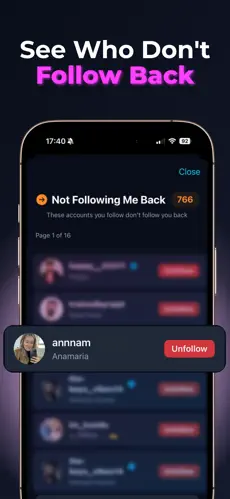
- Not Following Back: Accounts you follow that don't follow you
- Ghost Followers: Inactive accounts that never engage with your content
- Analytics: Growth charts, engagement trends, follower demographics
I was skeptical about the ghost follower detection at first. But after using it for a month, I removed about 200 accounts that had never liked a single post of mine. My engagement rate went from 2.1% to 3.4%. That's not huge, but it's noticeable, and it helps with Instagram's algorithm.
The Things I Don't Love
No app is perfect, and UnfollowGram has a few drawbacks worth mentioning.
iOS only. If you're on Android, you're out of luck for now. They've mentioned an Android version is coming, but there's been no concrete timeline. This is probably my biggest complaint because I know plenty of Android users who want this.
Some features require the Pro subscription. The free tier gives you basic unfollower tracking and limited history. If you want unlimited history, detailed analytics, and the ghost follower scanner, you need to upgrade. The pricing is reasonable (less than a coffee per month), but I know some people prefer fully free apps.
Push notifications can be delayed. The app syncs once per day, so if someone unfollows you at 2am, you might not get the notification until the next sync around 8am or so. It's not real-time in the strictest sense, but it's close enough for most people.
Who Should Download UnfollowGram
This app is perfect if you've been curious about who unfollowed you but didn't want to risk your account security. It's also useful for:
- Small business owners who want to keep their follower list clean and engaged
- Content creators tracking how their content affects follow/unfollow patterns
- Anyone who's been burned by password-stealing tracker apps before
- Social media managers who need to track multiple accounts (Pro feature)
If you're just casually curious, the free version works fine. I used it for two weeks before upgrading, and the basic features are genuinely useful on their own.
Bottom Line
After testing a dozen apps, UnfollowGram is the only Instagram follower tracker I actually kept installed. It does what it promises, it doesn't put your account at risk, and it has a clean interface that doesn't feel like a minefield of ads.
Is it perfect? No. I wish there was an Android version, and I wish the free tier included more history. But compared to everything else on the market, especially the password-stealing garbage that dominates the App Store, this is the one I'd recommend to friends.
You can download UnfollowGram for free and try it with the free tier first to see if it fits your needs.